Earn more with INDEXO Bank than anywhere else!
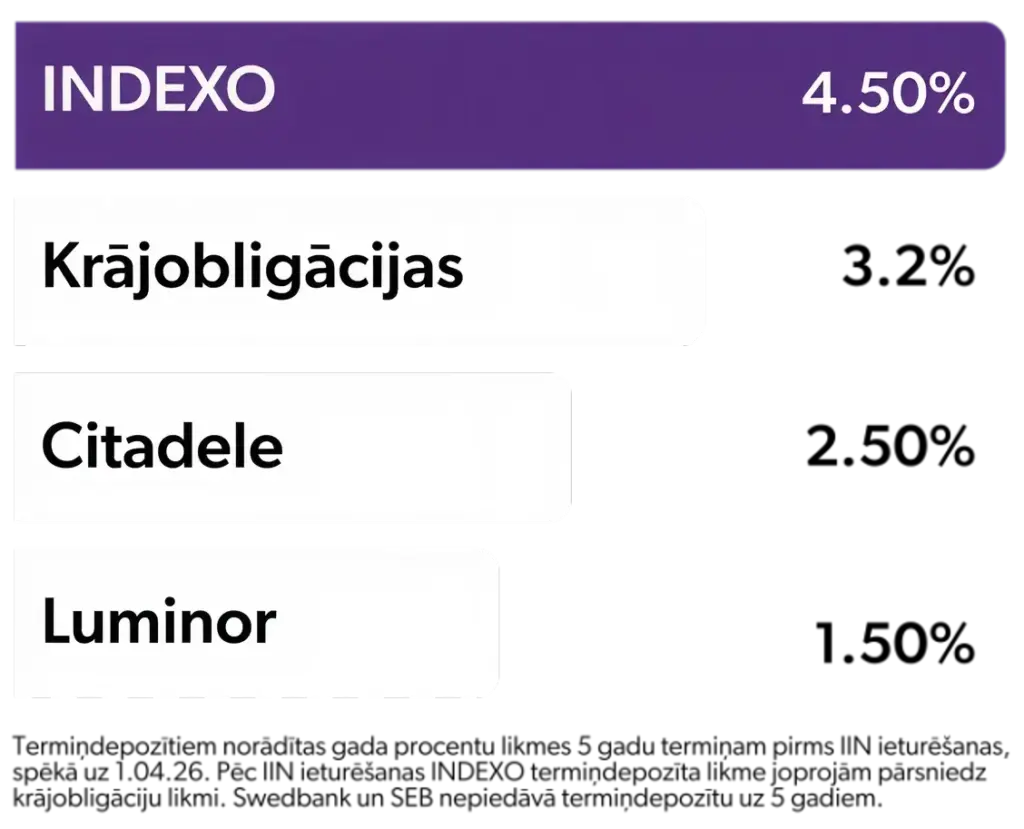
Our term deposit offer is even more rewarding than government bonds.
It’s a safe and simple way to earn without risk.
Start earning
Calculate how much you will get
The calculation is informative. The interest amount is calculated before withholding personal income tax.
Deposit conditions are available in INDEXO’s General Terms and Conditions.
INDEXO term deposit
annual interest rates
We work to increase your gains

your monthly % profit is reinvested.
your % profit is fixed.


INDEXO – the place where your money feels good and safe


Questions and answers
How can I enter into a time deposit agreement?
Everything can be done in a couple of seconds in INDEXO Bank’s mobile app.
- Open the “Savings” section of the INDEXO mobile app and press the “Add new savings” button;
- Select “Term deposit” and fill out the application – specify the desired term and amount;
- Confirm your agreement to the term deposit terms (including the applicable interest rate);
- Transfer the amount you want to invest to the term deposit account.
That’s all. Now your money is making money on its own.
Choose the level of flexibility you desire for managing your funds and earn the corresponding interest rate. With vaults, you can deposit and withdraw as much and whenever you want, without any application process or fees. It’s personalized to your preferences, allowing your savings to grow effortlessly.
What is the minimum and maximum deposit amount?
The minimum amount you can deposit with INDEXO is €100, while the maximum is €1,000,000.
How does compound interest work?
INDEXO term deposits use a compound interest approach—this means that your earned interest each month is added to the deposit principal. Thus, with each following month, interest is calculated on a larger amount, generating additional earnings. The earned interest will be calculated on the term deposit amount from the start date to the end date of the deposit (excluding the end date).
Once a month, INDEXO will credit the earned term deposit interest to your term deposit account. This interest will be added to the deposit principal, and the following month’s interest will be calculated based on this updated amount. In calculating interest, we apply an annual interest rate and assume a 360-day year. On the end date of the term deposit, we will transfer the deposit amount and accrued interest to your settlement account.
Please note that personal income tax will be withheld from the paid interest as prescribed by law.
What is the procedure for early termination?
To terminate a term deposit early, select the specific contract in the app, click “Manage,” and choose “Early Withdrawal.”
In the next window, you’ll see what you will lose as a client—accrued interest and a 1% penalty fee based on the original deposit amount. If you agree, contact the customer support team within the app, stating that you wish to end the contract early.
The contract will be terminated within one business day, and the remaining balance will be paid into your account.
Is it possible to add funds to a term deposit?
No. You can make all the necessary changes before signing the contract. After the contract is signed, it’s not possible to make changes or add to the deposited amount.
If the contract is already signed – don’t worry. You can always open a new term deposit with the remaining amount.
Is it possible to extend a term deposit?
Yes, INDEXO offers the option to activate automatic deposit renewal.
It’s convenient and profitable – with an extra +0.10 percentage points added to the interest rate valid at the time.
At the end of your deposit term, the earned interest will be paid to your current account, while the original principal will be reinvested for the same term at the current rate, including the bonus rate for renewal.
Why choose automatic renewal?
-
Continuous earnings – your money keeps working without interruption.
-
Convenience – no need to submit a new application each time.
-
Flexibility – you can cancel automatic renewal at any time before maturity.
How to activate automatic renewal:
-
Go to the “Savings” section and select your deposit
-
Click “Manage”
-
Click “Automatic renewal”
Automatic renewal is available to all clients.